
2.2 KiB
Raspberry | Pi

Middleware in python2.7 to show some information about your Raspberry Pi:
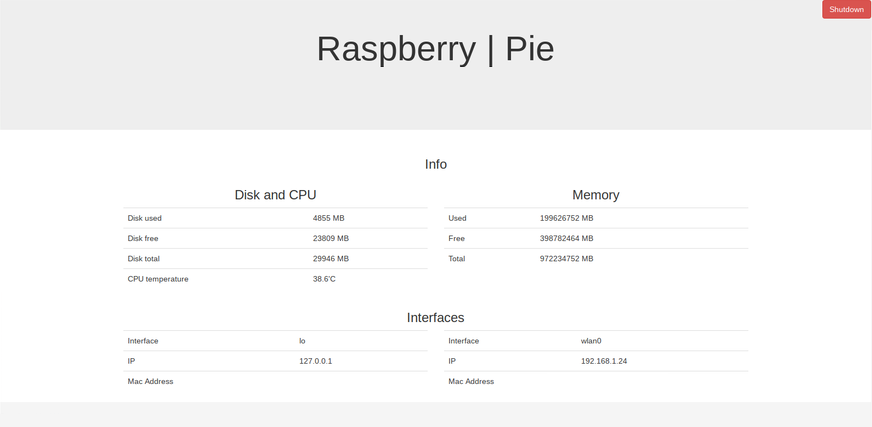
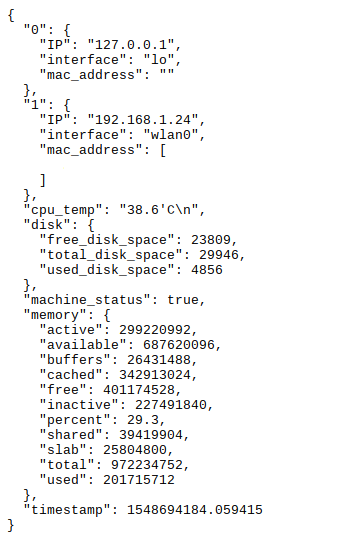
Interfaces:
- IP Address;
- Mac Address;
Disk and CPU:
- Disk used;
- Disk free;
- Disk total;
- CPU temperature;
Memory:
- Used;
- Free;
- Total;
Getting Started
The modules strive to be simple, well documented and modification friendly.
This software is developed with python 2.7 and some extra modules. You need to use one module like:
- pie
and you need to install extra dependencies like:
- flask==1.0.2
- netifaces==0.10.9
- psutil==5.6.2
- bson==0.5.8
- python-string-utils==0.6.0
Prerequisites
Install python2.7 - https://www.python.org/download/releases/2.7/
Install pip - https://pip.pypa.io/en/stable/
(optional)
Install docker - https://www.docker.com
Installing
Please, use the following command to install the requirements packages for this project:
pip install -r requirements.txt
if you prefeer, use docker:
docker build -t raspberry-project .
docker run -p 5000:5000 raspberry-project
Deployment
-
Run the shell script called init.sh
or
-
Go to the python folder and run api.py
Navigate to 127.0.0.1:5000 in your browser and the credentials are:
- admin
- admin
If you prefeer, you can navigate or use the POSTMAN to get the information via JSON: 127.0.0.1:5000/readpietojson
Built With
Contributing
Please read CONTRIBUTING.md for details on my code of conduct, and the process for submitting pull requests to me.
Versioning
I use SemVer for versioning. For the versions available, see the tags on this repository.
Authors

License
This project is licensed under the MIT License - see the LICENSE.md file for details